

Install the Edge Agent
Prepare, enroll, and verify a URUFI Linux gateway without losing the local safety boundary.
The URUFI Edge Agent runs on the Linux gateway at each site. It connects outbound to Manager and applies DHCP, captive access, firewall, traffic shaping, metrics, and RADIUS/EAP-TLS locally when those services are enabled.
The normal path uses install.sh and the first-run terminal wizard. Manual installation
and configuration references are kept at the end for recovery and review.
Before you begin
Prepare:
- an x86-64 or ARM64 Linux gateway using systemd;
- one client-facing LAN interface and one internet-facing WAN interface;
- root or
sudoaccess; - outbound TCP access to Manager port
9090; - reliable system time, preferably synchronized with NTP;
- a planned native LAN gateway CIDR, such as
10.10.0.1/24, unless the site is a pure tagged trunk; - the approved
urufi-agentbinary andinstall.shfrom your release channel.
The gateway must be in the packet path:
Internet ─ ISP router ─ WAN ─ [ Linux gateway + Edge Agent ] ─ LAN ─ switch/AP ─ clientsThe AP should bridge clients to the LAN. It must not hide them behind another NAT or run a competing DHCP server.
Use a maintenance window
This machine becomes the client default gateway and may become its DHCP server. Keep console access to the gateway while selecting interfaces and before moving production clients.
Record the real interfaces and confirm the WAN route:
ip -br address
ip route
timedatectl status
1. Get the release and transport CA
Use your approved release channel to obtain urufi-agent and install.sh. In the
Console, open Settings, find Transport certificate authority, and select
Download ca.pem.
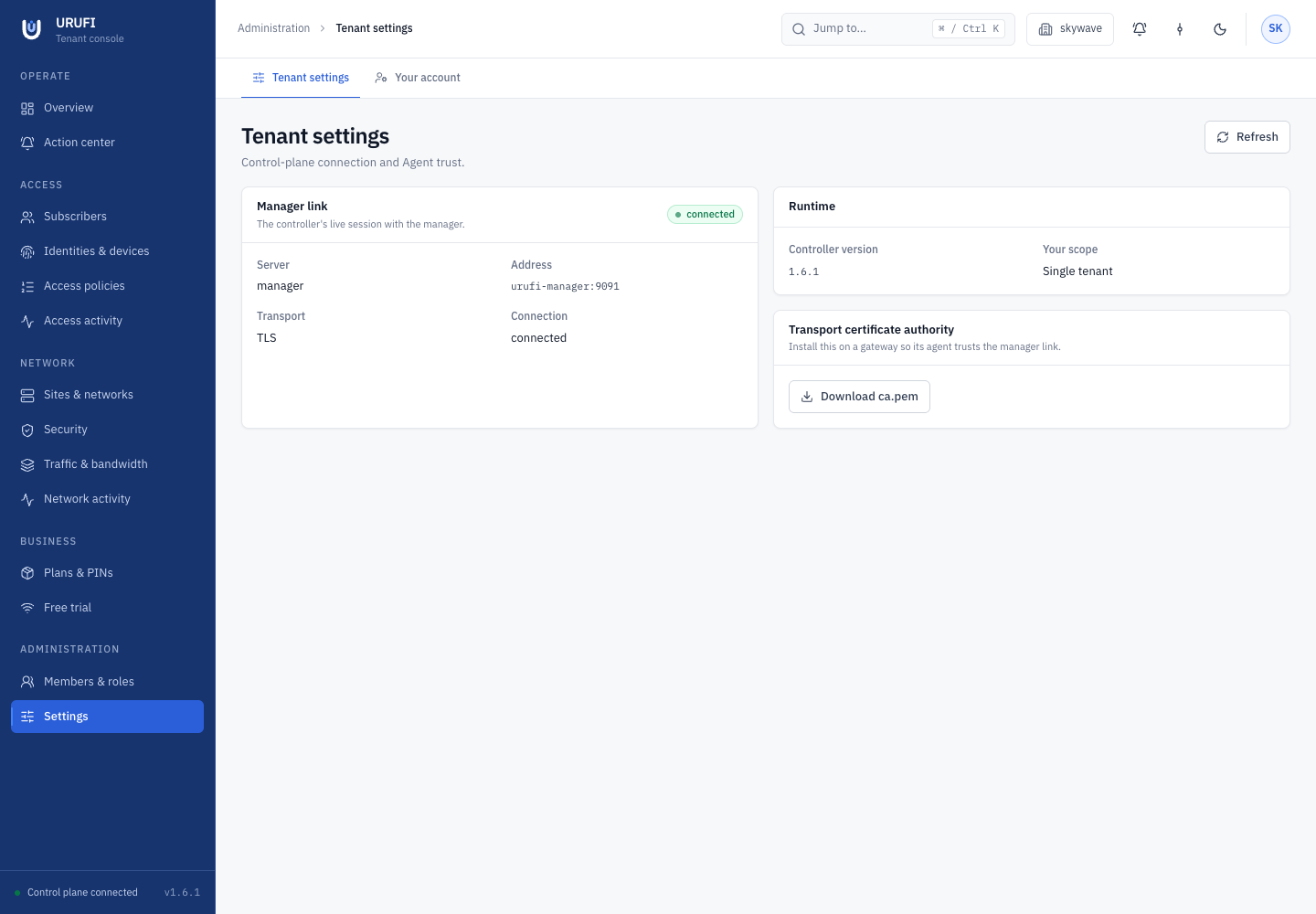
Copy the three files to the gateway. Rename the CA during installation if it was
downloaded as ca.pem:
scp urufi-agent install.sh ca.pem operator@gateway:/tmp/
sha256sum urufi-agent
Compare the SHA-256 value with the one published by your release process before running the binary. Network → Agent software shows the installation-wide published build inventory; it is not a substitute for an approved initial artifact-delivery channel.
2. Install the agent
On the gateway, from the directory containing the files:
chmod +x install.sh
sudo ./install.sh
sudo install -m 0644 ca.pem /etc/urufi/agent/manager-ca.pem
The installer adds the required networking packages, enables IPv4 forwarding, installs the binary in a versioned release slot, creates the configuration and durable state directories, and installs a restricted systemd service. It does not start the agent before enrollment and first-run configuration are complete.
Running the installer again updates the binary and unit while preserving the existing
/etc/urufi/agent/config.yaml.
If your release channel provides a trusted HTTPS URL, the installer can fetch the binary and verify its checksum:
sudo AGENT_BINARY_URL="https://downloads.example.com/urufi-agent" \
  AGENT_BINARY_SHA256="expected-sha256" \
  ./install.sh
3. Register the site
In the Console:
- Select the business that will own the site.
- Open Network → Sites & networks.
- Select Register site.
- Enter a clear Site name and its Management address.
- Select Register and store the One-time enrolment key immediately.
- Close the result, open the new site, and copy the site UUID shown beneath its name.
The site UUID is the Agent ID. The one-time key becomes the agent's authentication secret. They must come from the same registration.
The enrolment key is shown once
Store the key in your secret manager. Do not put it in tickets, chat, screenshots, or shell history. If it is exposed or lost before enrollment, replace the registration and issue a new key.
4. Run first-time setup
Start the terminal wizard:
sudo urufi-agent initialUse Tab and Shift+Tab to move between fields. Use Space or the arrow keys for toggles and interface choices.
| Field | What to enter |
|---|---|
| Agent Name | A recognizable gateway name |
| Agent ID | The site UUID from the Console |
| Manager Host | A hostname or address reachable from this gateway |
| Manager Port | 9090, unless Manager uses another listener |
| Auth Secret (Key) | The one-time enrolment key |
| Secure Link to Manager (TLS) | Enabled in production |
| Manager CA Certificate | /etc/urufi/agent/manager-ca.pem |
| LAN / DHCP Interface | The client-facing interface |
| LAN Port Mode | access, trunk, or hybrid |
| Native LAN Address | The untagged gateway CIDR; optional only for a pure trunk |
| Manage LAN Address | On when URUFI should assign and restore the native address |
| Allowed Managed VLANs | The local boundary, such as 100,200-220 |
| WAN Interface (internet) | The upstream interface |
The wizard rejects missing or identical LAN/WAN interfaces, unusable host addresses, and overlapping LAN/WAN networks.
Decide who owns the native address
Enable Manage LAN Address when URUFI should own the native gateway address. The wizard performs an ARP duplicate-address check, assigns the exact CIDR, and records its ownership so the agent can restore it after restart.
Leave it off when NetworkManager, netplan, systemd-networkd, OpenWrt, Docker, or another local system owns the address. The exact CIDR must already exist, and URUFI will not replace or remove it.
The local port mode and VLAN allow-list are safety controls. The Console can create only logical networks that fit inside this boundary.
When the wizard finishes, protect the generated file:
sudo chmod 0600 /etc/urufi/agent/config.yaml5. Check the gateway before starting
Confirm:
- LAN and WAN are different and their IPv4 networks do not overlap;
- the WAN has a default route;
- Manager is reachable on TCP
9090; - no competing service listens on DHCP UDP
67where URUFI will serve addresses; - each allowed VLAN is carried tagged by the switch and AP uplink;
- the native address exists locally, or URUFI is configured to manage it.
Useful checks:
ip -br address
ip route
nc -vz manager.example.com 9090
sudo nft list ruleset
6. Start and verify
sudo systemctl enable --now urufi-agent
sudo journalctl -u urufi-agent -f
A healthy connection includes messages equivalent to:
UFP: connecting to manager.example.com:9090 (tls=true)
UFP: authenticated with manager
UFP: received config update from manager
Return to Network → Sites & networks. The site should show Online. Open it and confirm its version, hostname, interfaces, native address, port mode, and allowed VLANs.
| Check | Expected result |
|---|---|
systemctl status urufi-agent | active (running) |
journalctl -u urufi-agent -e | Successful authentication and configuration receipt |
sysctl net.ipv4.ip_forward | net.ipv4.ip_forward = 1 |
sudo ls -l /var/lib/urufi-agent | Private durable state directory |
The site is now enrolled. Continue with edge services and networks before attaching production clients.
Optional secure and captive access
For a captive site, create a Captive — redirect to the portal network, configure Network → Security → Captive portal, then configure guest methods and branding under Business. Enable DHCP, Firewall, and Hotspot only after the network and portal dependencies exist. URUFI redirects ordinary HTTP; it does not intercept HTTPS.
For WPA2/WPA3-Enterprise, open Network → Security → RADIUS & EAP. Initialize EAP-TLS, configure
the secure SSID, and add the access point as a RADIUS client with its real source IP and
a strong shared secret. Then enable EAP-TLS in the site's Services tab. The AP sends
RADIUS authentication to the Edge Agent on UDP 1812; client devices use individual
certificates, not the AP shared secret.
Upgrade and rollback
Published builds appear under Network → Agent software. To update one connected site, open Network → Sites & networks, select it, and use the Software tab. The agent verifies the candidate size, SHA-256, version, and architecture before switching release slots.
An update restart briefly interrupts packet services. The new process restores durable last known good state before reconnecting. If it does not become healthy, the updater returns to the previous release slot.
For an agent installed before managed release slots existed, run the current installer once. Manual fallback remains:
sha256sum urufi-agent
sudo ./install.sh
sudo systemctl restart urufi-agent
sudo systemctl status urufi-agent
Do not roll back across an explicitly incompatible release without reviewing its release notes and configuration requirements.
Troubleshooting
Start with current boot logs:
sudo journalctl -u urufi-agent -b --no-pager| Symptom | Check |
|---|---|
| Site stays offline | Gateway DNS and routing, TCP 9090, Manager listener, and system time |
| TLS handshake fails | CA path and permissions, correct transport CA, clock, and optional tls.server_name |
| Authentication is rejected | Agent ID and one-time key came from the same current registration |
| LAN address is missing | Enable address management or configure the exact CIDR in the operating system |
| Duplicate-address check fails | Another device already uses the chosen gateway address |
| DHCP cannot start | Correct LAN/CIDR, UDP 67, and no competing DHCP server |
| Clients have no internet | Forwarding, WAN default route, firewall/NAT, and network gateway/subnet |
| Captive portal does not open | Hotspot, HTTPS portal settings, local DHCP lease, and a plain HTTP test request |
| EAP-TLS fails | EAP initialization, NAS source IP and secret, UDP 1812, and client certificate validity |
After editing /etc/urufi/agent/config.yaml, restart the service explicitly.
Manual installation reference
Use this only when the supported installer cannot be used.
sudo apt-get update
sudo apt-get install -y nftables iproute2 kmod iputils-arping ca-certificates

echo 'ifb' | sudo tee /etc/modules-load.d/urufi-ifb.conf
sudo modprobe ifb

echo 'net.ipv4.ip_forward = 1' | sudo tee /etc/sysctl.d/99-urufi.conf
sudo sysctl -p /etc/sysctl.d/99-urufi.conf

sudo install -m 0755 urufi-agent /usr/local/bin/urufi-agent
sudo install -d -m 0750 /etc/urufi/agent
sudo install -m 0644 ca.pem /etc/urufi/agent/manager-ca.pem
For dnf or yum, install equivalent packages. Use the systemd unit shipped with the
release so its capabilities, filesystem restrictions, state directory, and restart
behavior stay aligned with the agent version. Then run:
sudo chmod 0644 /etc/systemd/system/urufi-agent.service
sudo systemctl daemon-reload
Generated configuration shape
The first-run wizard writes /etc/urufi/agent/config.yaml with this structure:
agent:
  id: "site-uuid-from-the-console"
  hostname: "cafe-downtown-01"
  manager:
    host: "manager.example.com"
    port: 9090
    reconnect_interval: 5
    heartbeat_interval: 30
    metrics_interval: 10
  auth_secret: "one-time-enrolment-key"

network:
  wan_interface: "enp1s0"
  lan:
    interface: "enp2s0"
    mode: "trunk"
    native_address: null
    manage_native_address: false
    allowed_vlan_ids:
      - "100-299"

radius:
  bind: "0.0.0.0:1812"

logging:
  level: "info"

tls:
  enabled: true
  ca_cert: "/etc/urufi/agent/manager-ca.pem"
Physical topology changes require an agent restart. Older configuration blocks remain readable only when they agree with the current topology; conflicting old and new values fail startup instead of selecting an unsafe interpretation.